Products and pricing
Enter your products or services, their prices and what each one costs you. See the gross profit on each, with an optional price with VAT shown for reference.
Tools for working for yourself
OwnBoss · Excel download
Make a clearer plan for your next 24 months.
What should you charge? How much could you sell? What will be left after your costs? Put your own numbers into the planner and see your profit, your break-even sales and a stronger or tougher year, with the sums already built in.
£14.99including VAT
One payment. No subscription.
Buy now — £14.99Secure checkout and instant download through Payhip. Card, PayPal and wallet options are shown there.
Before you buy: How buying works · Planner licence · Refunds & cancellation
Checking your original purchase…
For help with an earlier purchase, email support@ownboss.co.uk with your order reference. You do not need to pay again.
£14.99 including VAT. One payment, no subscription.
One ZIP with your blank planner, a filled-in example and a quick-start PDF guide.
10 worksheets covering 24 months, up to 30 products or services and 15 running cost categories.
A Microsoft account and Excel for the web, plus somewhere to save your own copy.
Excel for the web. Desktop Excel, Google Sheets and Apple Numbers have not been tested.
We repair or replace it, or refund you where the law says. Refund policy · Licence
Enter your products or services, their prices and what each one costs you. See the gross profit on each, with an optional price with VAT shown for reference.
Plan sales and running costs month by month, with busy and quiet months, and see Year 1, Year 2 and 24-month totals.
See how much you need to sell each month to cover your running costs.
Change prices, costs, sales and running costs by a percentage and compare three versions of your year side by side.
Your headline figures and four charts on one page, from the weakest month to your best product.
A Checks page flags missing or mistyped figures, so you can fix them before you rely on the results.
SEE THE BIGGER PICTURE
The Dashboard brings the main numbers and charts together, so you can see how your plan is shaping up.
This screenshot is from the filled-in example for a fictional business. Your blank copy is ready for your own figures.
Open the Dashboard screenshot at full size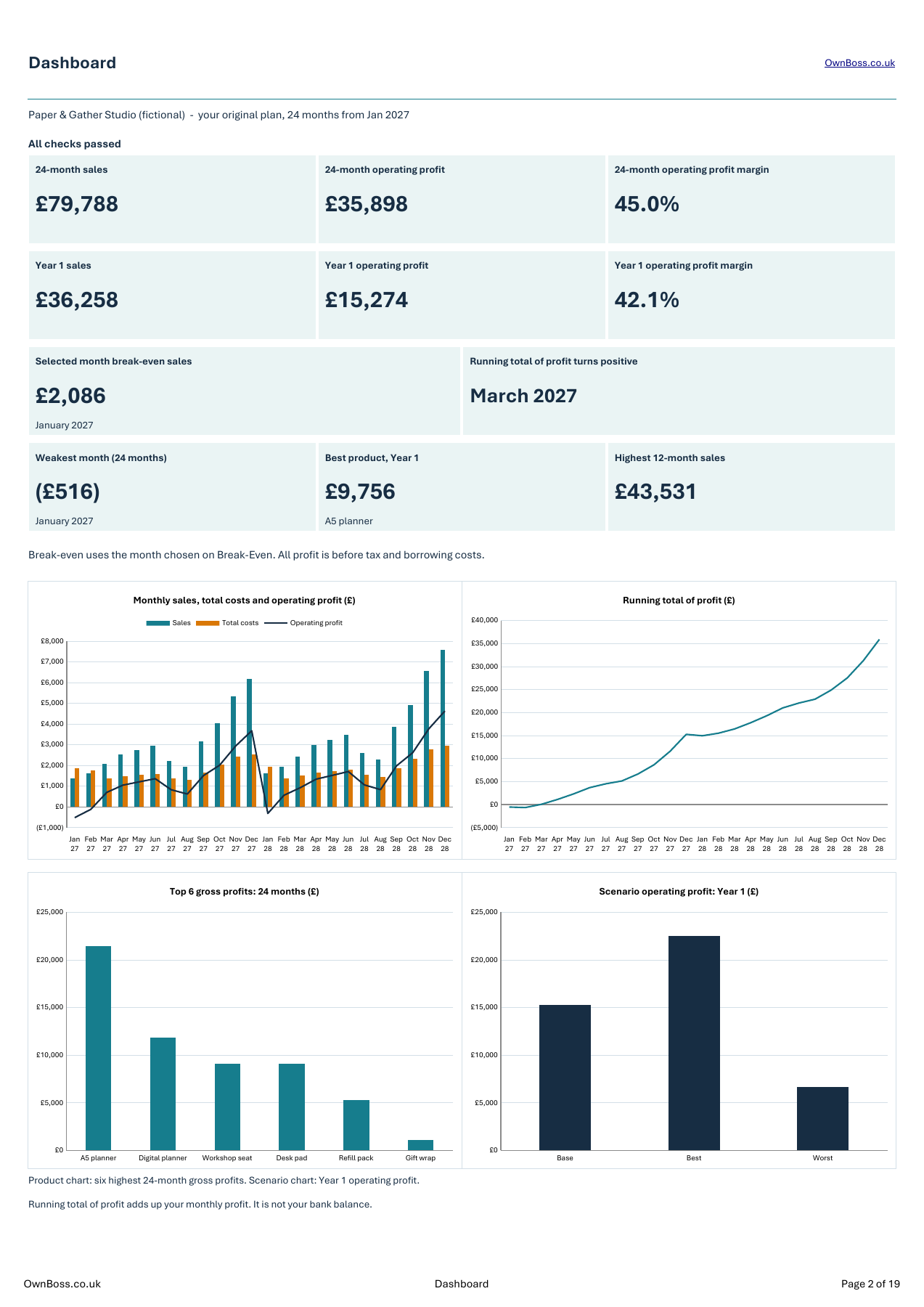
START WITH YOUR NUMBERS
Enter your products or services, their prices and what each one costs you. See the gross profit and margin for each one.
This view shows the filled-in rows from the fictional example business.
Open the Products screenshot at full size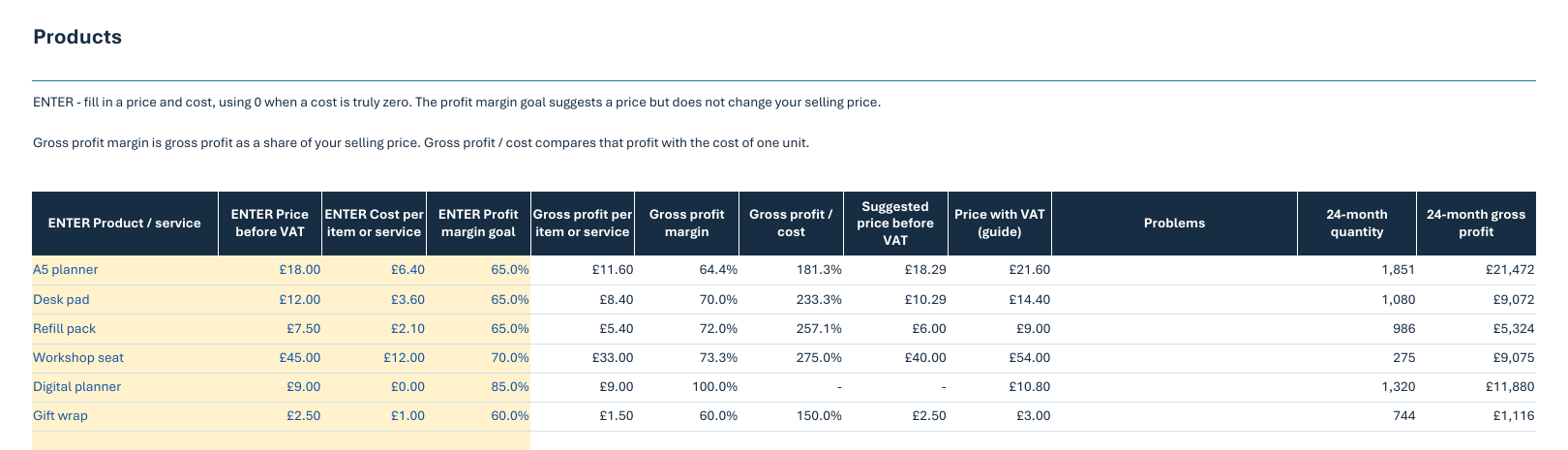
COMPARE YOUR OPTIONS
Change your selling prices, quantities and costs, then compare Base, Best and Worst results side by side.
See sales, costs, operating profit and margins for Year 1, Year 2 and the full 24 months.
These are the fictional example business’s figures and assumptions.
Open the Scenarios screenshot at full size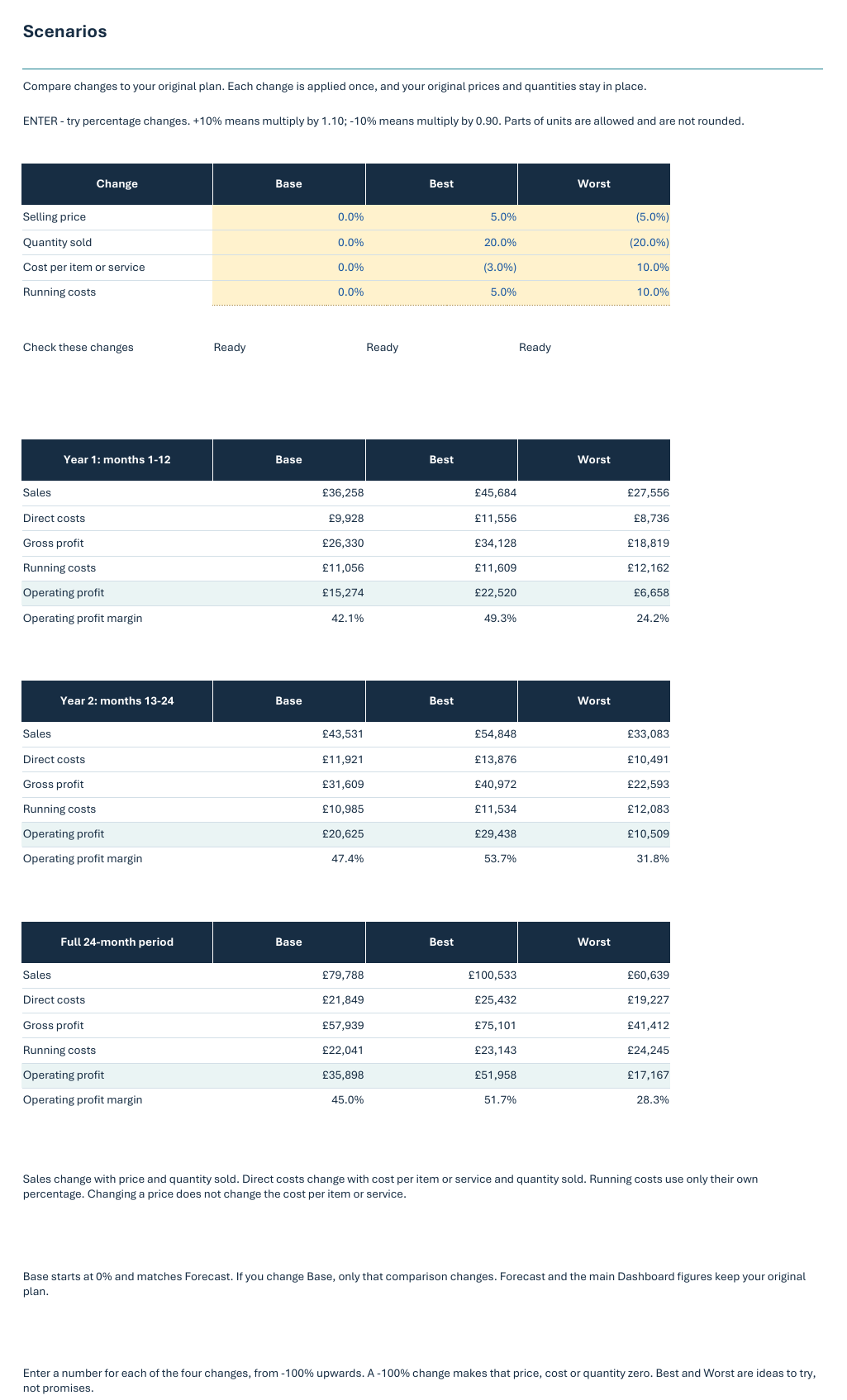
ONE DOWNLOAD. THREE USEFUL FILES.
Download one ZIP, open it, and save the files somewhere you can find them again.
Tested in Excel for the web. You’ll need a Microsoft account to use Excel for the web and somewhere to save your own working copy.
Start with your own business, prices and monthly plans.
OwnBoss-Business-Profit-Planner.xlsx
Follow a fictional business to see how a complete plan fits together.
OwnBoss-Business-Profit-Planner-Example.xlsx
Plain steps to help you open the files and start your plan.
OwnBoss-Quick-Start-Guide.pdf
A FEW THINGS TO KNOW
The planner comes as Excel files and has been tested in Excel for the web. You’ll need a Microsoft account, an internet connection and a browser. A computer or a larger screen will give you more room to work. Desktop Excel, Google Sheets and Apple Numbers have not been tested.
After successful payment, Payhip provides a download page and emails your receipt and private download link. Your immediate-download consent response is included in the receipt. Download the ZIP and open it to find the blank planner, example and PDF guide.
No. The total is £14.99 including VAT, paid once. There is no subscription.
It shows what your business could make based on the numbers you enter. Your results will change when your prices, sales or costs change. It helps you plan; it does not promise future profit or show your bank balance.
Check your spam folder if your receipt is missing. Email support if you need the Payhip receipt resent or have reached the download limit. If a file won’t open or the download doesn’t work, email support@ownboss.co.uk with your order reference. You do not need to pay again.
One purchase covers one business and its owners and staff. Your accountant may work on a copy solely for that business. Read the licence and refund and cancellation policy. For immediate downloads, Payhip checkout records your consent and includes the response in your receipt. The change-of-mind cancellation right ends once the download begins; faulty-file rights remain.
YOUR NEXT CHAPTER, IN NUMBERS
Quassim Yafai trading as OwnBoss.co.uk · Sole trader
32 Lime Close, West Bromwich, West Midlands, B70 9LJ, United Kingdom
Email: support@ownboss.co.uk
VAT number: 906726907 · ICO registration: ZA452425
Before you buy: How buying works · Planner licence · Refunds & cancellation.